
Step 1
Register a server owner account
Create your account at hytalebanlist.org. No API key needed — the plugin handles registration for you.
Official setup and command reference
This guide covers practical plugin setup for production moderation teams: install, magic link activation, import, command flow, fallback behavior, and compatibility checks. If you are preparing your server before release, this is your complete implementation checklist.
Step 1
Create your account at hytalebanlist.org. No API key needed — the plugin handles registration for you.
Step 2
Place extracted plugin JAR in Server/mods and restart once. Config file is generated automatically.
Step 3
Run /hbl auth in-game. The plugin will display a link in chat — click it to activate your server on the HBL Network. No key needed.
Step 4
Run /hbl import to process Server/bans.json and keep moderation history aligned with plugin flow.
Commands to run after install
/hbl auth
/hbl reload
/hbl importPrimary command set plus top-level aliases registered by plugin.
/hbl auth
/hbl reload
/hbl ban <player> [duration] [reason]
/hbl unban <player>
/hbl warn <player> [reason]
/hbl checkbans
/hbl import

Aliases: /ban /unban /warn /checkbans
Duration tokens: 30m 2h 7d 2w 1mo 1y perm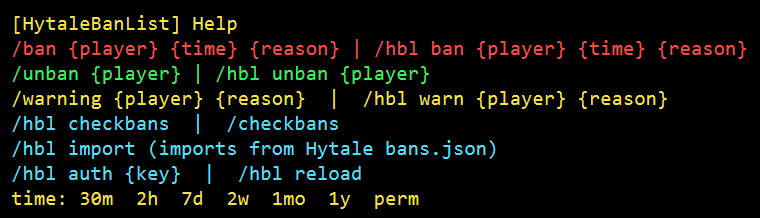
Assign these permission nodes to staff roles in your permission manager.
| Field | Default | Purpose |
|---|---|---|
| api.key | auto | Set automatically when you run /hbl auth. Do not edit manually. |
| messages.kickMessage | Template string | Kick message placeholders: {reason}, {expires}, {appealUrl}. |
| moderation.warningThreshold | 3 | Warnings needed before automatic ban trigger. |
| moderation.defaultBanDuration | perm | Fallback duration for /ban when no explicit time token is supplied. |
| general.locale | en | Locale file key loaded from plugin locales folder. |
| general.replaceNativeBanCommands | true | Uses plugin moderation commands in place of default native command flow. |
Disable overlapping moderation features in other mods. Plugin accepts both object and flat styles.
"ban": { "enabled": false },
"freeze": { "enabled": false }

OR

"ban": false,
"freeze": falseIf API limit is exhausted, plugin runs fallback mode, queues unsynced bans, then retries sync after UTC reset.
Use your own moderation portal host (appeals/search/listing) with CNAME + TXT verification.
CNAME  bans.yourserver.com -> appeals.hytalebanlist.org
TXT    _hytale-verify.bans.yourserver.com = hbl_verify_<token>
Subdomains are recommended. Verify in dashboard after DNS propagation.